Most nanny cams do have the ability to record audio in addition to video, but not all of them do it by default — and whether you can legally use that feature depends entirely on where you live. Audio recording laws vary state by state, and in some places, recording someone’s voice without their consent is a serious legal issue even inside your own home. Before you enable that feature, you need to know what your camera can do, what your state allows, and how to use it the right way.
I’ve been in this industry for over 25 years, and I’ll tell you — the question I get more than almost any other when someone is shopping for a hidden camera isn’t about resolution or night vision. It’s about audio. And the reason people ask is the same every single time: they’re worried. They love someone — a baby, a toddler, an aging parent — and they need to know that person is being treated right when they’re not in the room. That’s not paranoia. That’s love. And it deserves a real answer.
How does audio recording work in nanny cams?
Here’s the thing — a nanny cam with audio recording works very similarly to the microphone on your smartphone. There’s a small built-in mic inside the camera housing that picks up ambient sound within a certain range. Better cameras can capture clear conversation from across a room. Lower-end models might only pick up sounds within a few feet, or the audio quality might be muffled enough to be nearly useless.
Most modern nanny cams that support audio will either record it continuously alongside the video footage, or they’ll let you toggle audio on and off through an app or settings menu. That toggle matters more than most people realize — because just because the hardware is capable doesn’t mean it’s always on. Some cameras ship with audio disabled by default precisely because of the legal sensitivities involved.
If you want to understand more about how these cameras function from the ground up, I’d encourage you to read our post on how nanny cams work — it covers the full picture from motion detection to cloud storage in plain language.
The microphone quality is also something worth paying attention to when you’re shopping. A camera might advertise “audio recording” and technically deliver on that promise with audio that’s so degraded it tells you nothing. Look for cameras that specifically mention noise reduction or enhanced audio pickup — those are the ones that will actually give you usable recordings if you ever need them.
Is it legal to record audio on a nanny cam in your home?
Now look — this is the part where I have to be honest with you, because I care too much about your situation to gloss over it. I’m not a lawyer, and nothing I say here is legal advice. But I can tell you what you absolutely need to know before you start recording audio in your home.
The United States operates under a federal wiretapping law that generally requires at least one party in a conversation to consent to being recorded. That’s called “one-party consent,” and in many states, it means you — the homeowner — can legally record conversations in your own space. But a significant number of states require “all-party consent,” meaning everyone being recorded needs to know about it. If your caregiver is in one of those states and you record their voice without telling them, you could be looking at real legal exposure, even if the person was harming your child.
I’m gonna tell you right now — check your state’s laws before you enable audio. A quick search for “[your state] two-party consent recording law” will point you in the right direction. And if you’re not sure, err on the side of transparency. Telling a caregiver that your home has cameras is not weakness — it’s often the most effective deterrent you can have.
The good news is that video-only recording is far less legally complicated in most places. If you’re in a two-party consent state, you can often still run video without audio and stay fully within the law while still getting the documentation you need.
What’s the difference between a nanny cam with audio and one without?
Beyond the legal dimension, there’s a practical question here that a lot of parents don’t think through until after they’ve bought something: what does audio actually add to the picture?
Video footage can show you a lot — a caregiver’s body language, the way they handle your child, whether they’re attentive or distracted. But audio fills in gaps that video alone can miss. Tone of voice. Whether someone is speaking harshly, using threats, or simply ignoring a crying child. Sometimes the most important thing you need to know isn’t what someone did — it’s what they said and how they said it.
For families caring for an elderly parent or a non-verbal child, audio can be even more critical. If your loved one can’t tell you what happened, you need every tool available. That’s why I always recommend taking a look at whether nanny cams and elder care cameras are the same thing — because the answer shapes which type of camera is right for your specific situation.
On the flip side, cameras without audio are simpler to deploy legally, simpler to explain to a caregiver during the hiring process, and often good enough for the majority of monitoring situations. If your main concern is ensuring your child isn’t being physically mistreated, video alone goes a long way.
Where should you place a nanny cam to capture usable audio?
Placement is everything when it comes to audio. A camera mounted up in the corner of a room — great field of view, but the microphone might be too far away from where conversations happen to pick up anything intelligible. Audio doesn’t travel the same way light does. Distance and soft furnishings eat it up fast.
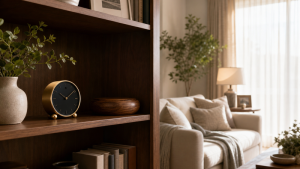
For the best audio capture, you want the camera positioned at a conversational level — closer to where people actually sit or stand and talk. A camera hidden in a bookshelf, a small decorative object on a side table, or a clock on a mantel will almost always deliver better audio than a ceiling-mounted unit. The closer the mic is to where your caregiver interacts with your child, the more useful the recording will be.
If the primary room of concern is a bedroom — where nap time or nighttime routines happen — our nanny cam for bedroom options are worth a close look. Bedroom placements come with their own set of considerations around privacy and discretion, and we’ve put together options that balance both.
Think through the typical daily routine in your home. Where does the caregiver spend the most time with your child? Where do they feed, play, or settle down for rest? That’s your primary placement location. You can always add secondary cameras for wider coverage, but start where the most meaningful interactions happen.
Should you tell your caregiver about the nanny cam?
I know this feels like a sensitive question, and I get it. You don’t want to seem like you’re accusing someone before they’ve done anything wrong. But here’s what 25 years in this business has taught me: transparency is almost always the smarter move, and it’s almost always the more protective one too.
When a caregiver knows cameras are present, behavior changes. That’s not a cynical observation — it’s just human nature. The vast majority of caregivers are good people doing a difficult job. Knowing there’s a camera usually just makes them more conscientious. And if someone’s intent is bad, the knowledge that they’re being recorded is often enough to make them reconsider.
From a legal standpoint, disclosing that your home has video and audio monitoring puts you on solid ground in virtually any state. You can do this during the hiring conversation — just mention that your home has security cameras for your family’s safety. You don’t have to detail every placement. Many families include it in their household agreement in writing.
The hidden camera question is one we’ve addressed in more depth in our post on how to set up a nanny cam without anyone knowing — which covers both the how and the when of covert placement, because sometimes the situation genuinely calls for it.
What should you look for when buying a nanny cam with audio recording?
If you’ve decided audio recording is right for your situation, here’s what to focus on when you’re comparing cameras. Don’t just look for the words “audio recording” in the product description — dig a little deeper.
First, look for a camera that lets you control audio independently of video. You want the flexibility to turn it on or off without affecting your video recording. Second, check whether audio is stored locally, in the cloud, or both — and whether there are any storage limitations on audio-enabled recordings. Audio files add to storage load, and some cloud plans throttle or omit audio if you’re on a basic tier.
Third, pay attention to the microphone range listed in the specs, and read user reviews specifically mentioning audio quality — not just picture quality. A camera that gets glowing reviews for 1080p video might have a nearly useless microphone. And fourth, look for a camera that integrates audio and video in a single synced file, not separate files. When you need to review footage, you want to hear and see the same moment simultaneously without manually syncing two files.
Also consider whether you need night vision — because most night vision cameras automatically switch to infrared mode in low light, which has no effect on audio but may affect how you interpret certain sounds if you’re watching in pitch black. For more on that topic, our post on what the specs don’t tell you about night vision nanny cam performance will save you from some real surprises.
Frequently Asked Questions About Nanny Cam Audio Recording
Do all nanny cams have audio recording?
No — not all nanny cams include a microphone or audio recording capability. Many budget models are video-only. When audio is available, it’s sometimes disabled by default in the settings. Always check the product specifications before purchasing if audio recording is important to your monitoring needs, and verify the feature is actually enabled before relying on it.
Can I record audio in my home without telling the caregiver?
It depends on your state. In one-party consent states, you can generally record in your own home without notifying others. In two-party or all-party consent states, secretly recording someone’s voice may be illegal even on your own property. Always verify your state’s specific wiretapping and recording laws before enabling audio on any monitoring device.
Will a nanny cam pick up audio through walls or from another room?
No — standard nanny cam microphones are not powerful enough to pick up audio through walls or from a significant distance. Most built-in mics have an effective range of roughly 10 to 20 feet in open air, and that range drops substantially with walls, doors, or background noise. For reliable audio capture, the camera needs to be in the same room as the activity you’re monitoring.
Is nanny cam audio admissible in court?
Audio recordings may be admissible as evidence if they were obtained legally — meaning you followed your state’s consent laws. Illegally obtained recordings can actually hurt your case and expose you to liability. If you believe you have documented abuse or mistreatment, consult a family law attorney immediately about how to preserve and present that evidence properly.
How do I know if my nanny cam’s audio is actually recording?
The most reliable way is to do a test recording in your home and play it back. Speak at a normal conversational volume from various spots in the room and check whether the recording captures it clearly. Most app-based cameras show a microphone icon or audio waveform indicator when audio is actively recording. Check your settings to confirm audio hasn’t been toggled off.
Does audio recording drain the nanny cam battery faster?
For battery-powered hidden cameras, yes — audio recording does add to power consumption, though typically not dramatically. If you’re running a camera on battery and want to extend runtime, switching to video-only mode can help. Most plug-in cameras are unaffected since they’re drawing from a continuous power source rather than a battery.
Can my nanny cam audio be hacked or accessed by others?
Any internet-connected camera — including audio-enabled ones — carries some risk of unauthorized access if the device isn’t properly secured. Always use a strong, unique password for your camera account, enable two-factor authentication if available, keep your camera’s firmware updated, and make sure your home Wi-Fi network is secured. Avoid cameras from unknown brands with no security track record.
What’s the audio quality actually like on hidden nanny cams?
It varies considerably by model. Premium cameras deliver clear, intelligible speech from across a room. Lower-cost cameras may produce muffled or distorted audio that’s difficult to use. Key indicators of better audio quality include noise reduction features, enhanced microphone specs, and positive user reviews specifically mentioning audio. Don’t assume the audio quality matches the video quality — they’re often very different.
At the end of the day, the reason you’re thinking about any of this is because someone you love needs protection when you can’t be there yourself. I’ve watched parents light up with relief when they realize there are real tools that can help them do that — tools that fit into a normal home, don’t require a tech background to operate, and give them genuine peace of mind instead of just the feeling of it. That’s what this is all about.
Take the time to understand what your camera can and can’t do with audio. Know your state’s laws. And make a deliberate choice — not a default one. If you’re ready to explore your options, browse our nanny cam for bedroom collection and find something that fits your home and your situation. May you and your loved ones stay protected.