To set up a nanny cam without anyone knowing, you need three things working together: a camera hidden inside an object that already belongs in that room, a reliable power source that doesn’t require visible cables, and a Wi-Fi connection strong enough to stream or record without interruption. Get those three right, and the setup is nearly invisible. Miss any one of them, and the camera either gets spotted or stops working when you need it most.
Here’s the thing — most people approach this backwards. They start by asking “where should I hide it?” when the smarter question is “what does this room already have that nobody looks twice at?” That shift in thinking changes everything about how you shop, how you place, and how you maintain a hidden camera setup that actually holds up over time. I’ve been in this industry 25+ years, and the setups that get discovered almost always fail for the same reasons: wrong object, wrong placement, wrong power plan. Let’s fix all three.
Why does the disguise matter more than the camera itself?
Most people obsess over resolution and frame rate before they’ve solved the more fundamental problem: a camera that looks like a camera will eventually get found. The disguise isn’t a feature — it’s the whole strategy. A hidden camera built into an alarm clock, a smoke detector, or a picture frame works not because it’s invisible, but because it’s expected. Nobody questions an alarm clock on a nightstand. That cognitive invisibility is more powerful than any physical hiding spot.
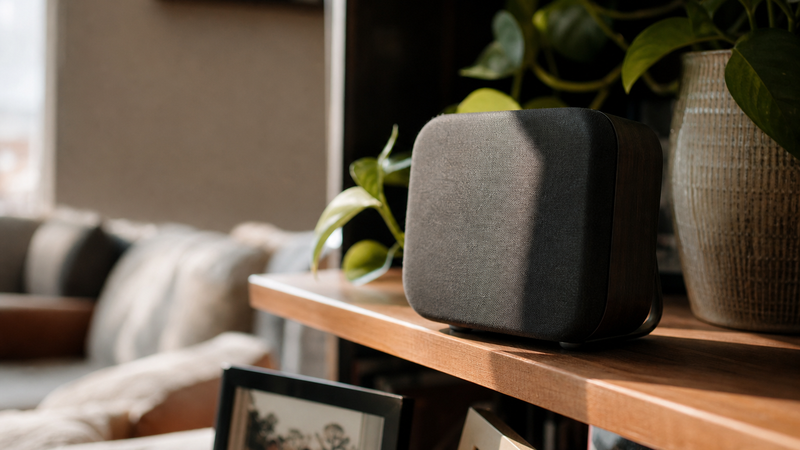
Here’s the counterintuitive part: the best disguised cameras are built into objects people interact with daily. An alarm clock gets noticed when it disappears — which is exactly what keeps it in place. A smoke detector on the ceiling is so familiar that eyes slide right past it. When you’re shopping for a nanny cam for the bedroom, look for units built into objects that already live in that specific room. A bedroom cam in a bookshelf speaker makes sense. That same camera in a kitchen would look out of place and raise questions.
The object should fit the room’s story. Walk into the space you want to monitor and ask: what’s already here that nobody would move, question, or unplug? That’s your camera housing. The technology follows the logic of the room — not the other way around.
Where should you position a hidden camera for the best coverage?
Placement is where most DIY setups either win or lose. The default instinct is to aim for the center of the room, but that’s almost never optimal. You want to capture faces — and faces are most readable when the camera is at or slightly above eye level, angled slightly downward. That typically means a shelf, a mantle, or a media unit — not a ceiling corner where you’ll get the tops of everyone’s heads.
Think about the traffic patterns in the space. Where do people naturally stand or sit? Where does the caregiver spend most of their time with the child? Position the camera so that location is within the frame’s center third. Wide-angle lenses on most modern hidden cameras give you more room than you think — but wide angle also distorts edges, so you want your key zone in the middle of the shot, not the periphery.
Avoid placement directly facing a window. Backlighting will blow out the image and turn everyone into a silhouette — I’ve seen people burn an entire week of footage this way and not realize it until they needed to review it. If natural light is in the room, position the camera so the light source is behind or to the side of the camera, not behind the subject. That one adjustment alone can be the difference between usable footage and worthless video. If lighting is a concern, check out this breakdown on what the specs don’t tell you about night vision nanny cam performance — it covers the low-light variables that most product listings skip entirely.
How do you power a hidden camera without visible cables?
This is the problem that trips up more people than any other part of the setup. A camera with a dangling power cord immediately draws attention — cords that don’t seem to go anywhere are the number one thing that gets a hidden camera spotted. You have two real options: battery-powered cameras, or cameras that run off power that’s already in the room.
Battery-powered units give you maximum placement flexibility. No cord management, no explaining why there’s a cable running behind a bookshelf. The tradeoff is maintenance — batteries die, and a dead camera gives you nothing when you need it most. If you go battery-powered, build a check schedule into your routine. Every Sunday morning, check the battery level through the app. Treat it like checking smoke detector batteries — except you actually need to do this one.
The smarter long-term solution is a camera disguised as something that’s already plugged in — a clock radio, a charging pad, a USB charger block. These run off wall power continuously, which means you’re not managing battery cycles. The cord is already expected. Nobody questions why an alarm clock is plugged in. Now look — this does limit placement to areas near outlets, so you may need to think about room layout before you commit to a specific camera style.
What Wi-Fi setup do you actually need for a hidden nanny cam to work reliably?
Most hidden cameras today are Wi-Fi enabled, which is genuinely useful — you can check in from anywhere, get motion alerts on your phone, and review footage without pulling a memory card. But Wi-Fi also introduces a failure point that people don’t think about until the camera goes offline at 2 PM on a Tuesday for no apparent reason.
The rule of thumb: your camera needs a consistent signal of at least -67 dBm at its location. If your router is two rooms away and the camera is tucked behind a bookshelf, you may have a signal problem. Before you commit to placement, test signal strength at that specific spot using a free Wi-Fi analyzer app on your phone. If the signal is marginal, a Wi-Fi extender placed in that room will fix it — and unlike the camera, an extender doesn’t need to be hidden.
I’m gonna tell you right now — 2.4 GHz is almost always more reliable for hidden cameras than 5 GHz. The 5 GHz band is faster but has shorter range and struggles more with walls and interference. Most hidden cameras default to 2.4 GHz for exactly this reason. If your router asks you to choose during setup, go with 2.4 GHz and save yourself the troubleshooting headache later.
Also worth considering: local storage backup. A camera that only streams to the cloud will give you nothing if your internet goes down. Look for units with a micro SD card slot as a fallback — continuous local recording means you don’t lose footage during an outage, and you have a redundant copy if anything happens to your cloud account.
How do you keep your hidden camera footage private and secure?
Setting up the camera is only half the job. Securing the footage is the half most people skip — and it’s the half that matters when things go sideways. Start with the app credentials. Use a unique, strong password for your camera account — not the one you use for email, not a variation of your last pet’s name. Enable two-factor authentication if the app supports it. This is the most overlooked step in the entire process.
Change the default device name in the app settings. Default names often include the camera model, which can reveal information about your setup to anyone who somehow accesses your network. Give it a generic, neutral name. If your camera requires a static IP or appears in your router’s device list, name it something unremarkable there too.
Think about who has access to the footage. If you’re sharing camera access with a spouse or co-parent, does that access need to be read-only, or do they need full control? Most apps let you set permission levels — take five minutes to configure this correctly instead of giving full admin access by default. Footage that documents something important loses its value if chain of custody is unclear.
What are the legal basics you need to know before setting up a hidden camera?
I’m not going to give you legal advice — that’s not my place, and the rules vary by state. But here’s what I can tell you: the general principle most states operate on is that you can use hidden cameras in your own home in areas without a reasonable expectation of privacy. That typically means common areas — living rooms, kitchens, hallways. Bedrooms and bathrooms are a different category, and audio recording is almost always a separate legal question from video.
If you have any doubt about what’s permissible in your specific situation, talk to a local attorney before you set anything up. I know that sounds like overkill, but a five-minute phone call is worth it. And here’s the practical side: if you’re monitoring a caregiver and something happens, you want your footage to be usable — legally clean footage is the only kind that helps you when it counts.
If you’re using a camera for elder care situations rather than childcare, the legal and ethical landscape has some meaningful differences. This post on whether nanny cams and elder care cameras are the same thing is worth reading before you finalize your setup plan.
Frequently Asked Questions About Setting Up a Hidden Nanny Cam
Can someone detect a hidden nanny cam with their phone?
Yes — there are apps designed to detect camera lenses using the phone’s flashlight and front camera, and RF detectors can pick up wireless signals from actively transmitting cameras. This is why placement and power strategy matter. A well-placed camera inside a credible object, transmitting only during scheduled windows rather than continuously, is significantly harder to detect than one streaming 24/7 from an obvious location.
Do hidden nanny cams work without Wi-Fi?
Some do. Cameras with local storage — typically a micro SD card — record continuously without any internet connection. You review footage by removing the card or connecting directly to the device. The tradeoff is no remote viewing and no real-time alerts. For situations where Wi-Fi isn’t reliable or you’d prefer no cloud connection at all, local-storage-only cameras are a practical and private option.
How long does a hidden camera battery last?
It depends heavily on whether the camera records continuously or only when motion is detected. Continuous recording drains batteries in hours. Motion-activated cameras can stretch battery life to days or even weeks in low-traffic areas. Most battery-powered hidden cameras are designed for motion-triggered recording specifically to maximize runtime. Check the manufacturer’s specs for standby versus active recording hours — they’re very different numbers.
What’s the best room to put a hidden nanny cam in?
The room where the caregiver and child spend the most time together. For most households, that’s the living room or a dedicated playroom. Position the camera to cover seating areas and floor space where interaction happens. Avoid rooms that could create legal complications — bathrooms are always off-limits, and bedrooms require extra caution depending on your state’s laws. Common areas are both the most legally defensible and the most practically useful placement.
How do I check my nanny cam footage remotely?
Through the camera’s companion app on your smartphone. Once the camera is connected to your home Wi-Fi and registered to the app, you can view the live feed, review recorded clips, and adjust settings from anywhere with a cellular or internet connection. Most apps also offer motion alerts — push notifications that tell you activity was detected, so you’re not watching a live feed all day. Set alert sensitivity carefully; too high and you’ll get notified every time a curtain moves.
Can I set up a nanny cam without a subscription?
Many cameras offer free local storage without a subscription, using a micro SD card. Cloud storage and extended video history typically require a monthly or annual plan. If you want continuous cloud backup, expect a subscription cost. If you’re comfortable managing a memory card manually and reviewing footage on-device, you can run most modern hidden cameras indefinitely without paying for a cloud plan. Check the specs before buying — storage options vary significantly by model.
Will a hidden camera slow down my home Wi-Fi?
A single camera streaming at standard definition uses minimal bandwidth — typically 1–2 Mbps. High-definition streaming uses more, around 4–8 Mbps depending on resolution. For most home networks, one or two cameras will have no noticeable impact. Where problems arise is when multiple cameras run simultaneously on an already congested network. If your network is already busy with streaming devices, gaming, and video calls, consider a dedicated IoT network segment for your security cameras.
What should I do if I think my nanny cam has been found?
First, check your app for any unusual activity — failed logins, settings changes, or gaps in recorded footage. If the camera has been moved or unplugged, note the time it went offline. Don’t immediately confront anyone until you’ve reviewed all available footage from before the disruption. If the situation escalates, having a documented record of what the camera captured prior to being found may be important. Consider your next steps carefully before acting on assumptions.
Now look — setting up a hidden nanny cam isn’t about distrust for its own sake. It’s about having eyes on the people and moments that matter most when you can’t be physically present. The families I’ve talked to over the years who’ve used these setups well all say the same thing: most of the time, it confirms what they already hoped was true. Peace of mind isn’t a small thing. And on the rare occasion something needs to be documented, you’ll be grateful the camera was there and working correctly.
If you’re ready to start looking at options, check out our selection of bedroom nanny cams — each one is built into an everyday object, designed for real home environments, not just spec sheets. You’ve got questions, we’ve got answers. Stay safe out there, and may you and your loved ones stay protected.